At its core, legal document automation software is a system that transforms the slow, manual, and often risky process of creating legal documents into a quick, guided workflow. It uses intelligent templates and libraries of pre-approved clauses to help you assemble accurate, compliant documents in a fraction of the time it used to take.
This isn't just about saving a few minutes; it's about fundamentally solving the problem of administrative drag that plagues legal and business teams, freeing them up for the strategic work that actually matters.
What Legal Document Automation Software Really Does

It’s tempting to think of this software as a fancy template filler, but that misses the point entirely. It’s better to think of it as a powerful co-pilot for your legal work.
Instead of the old, dangerous method of finding a similar contract, hitting "Save As," and praying you catch all the details you need to change, this software provides a structured framework. It ensures every single contract, NDA, or policy you generate is built from the most current, approved legal language your organization has.
The magic happens when static templates are turned into dynamic, intelligent assets. You answer a series of simple questions or fill out a smart form, and the software does the heavy lifting—it automatically pulls in the right clauses, inserts the correct data, and produces a clean, finished document. This structured approach virtually eliminates the human errors that inevitably sneak into manual drafting, like wrong dates, misspelled names, or outdated legal terms.
Manual Drafting vs Automated Document Creation
For far too long, creating legal documents has been a painstaking chore. It was a cycle of digging through old folders, carefully doing a "find and replace" on names and dates, and just hoping you didn't miss something critical. That process isn't just slow; it’s a massive liability.
Legal document automation flips that entire dynamic on its head. The focus shifts from mind-numbing repetition to efficient, controlled production. The table below really drives home the difference.
| Task | Manual Process (Before Automation) | Automated Process (With Software) |
|---|---|---|
| Initial Drafting | Search for a similar past document; copy and paste content. | Answer a guided questionnaire to generate a new document from a pre-approved template. |
| Data Entry | Manually find and replace names, dates, and amounts. | Information is automatically populated from a central source, ensuring accuracy. |
| Clause Selection | Hope the copied clauses are correct and up-to-date. | System automatically includes or excludes clauses based on conditional logic (e.g., deal size, location). |
| Version Control | Filenames like "Contract_Final_v3_USE_THIS_ONE.docx" create confusion. | Centralized system tracks all versions automatically with a clear audit trail. |
| Risk of Error | High risk of outdated terms, typos, or formatting mistakes. | Significantly lower risk due to standardized language and automated assembly. |
The contrast couldn’t be clearer. One path is littered with bottlenecks, inconsistencies, and risk. The other offers speed, accuracy, and genuine control.
Legal document automation is about creating a single source of truth for your contracts. It moves teams away from a chaotic mess of outdated Word documents and toward a controlled, consistent, and scalable system for generating legal paperwork.
This shift does more than just reclaim wasted hours. It builds a more reliable, professional, and defensible operation. When every document you produce adheres to the same high standard, you slash your legal risk and reinforce your brand's consistency with every signature.
Core Capabilities That Modernize Legal Work

To really get why legal document automation software is such a big deal, you have to look under the hood. The features aren’t just abstract concepts; they’re practical fixes for the everyday headaches that bog down legal and business teams. Each one is built to replace a manual, error-prone task with something smarter and more reliable.
Think of it like a modern workshop. A carpenter isn't going to use a handsaw when a power saw gives them speed and precision. In the same way, legal pros use these tools to build better documents, faster.
Intelligent Document Generation from Smart Forms
At the very center of it all is the ability to generate complex documents from simple inputs. Instead of cracking open a Word doc and manually editing everything, you fill out an interactive questionnaire—a "smart form." You answer a few straightforward questions, and the software assembles the final document based on your answers.
This completely flips the script on drafting. The focus shifts from tedious find-and-replace work to just providing the right information once.
For instance, when creating a sales agreement, the form might ask:
- What’s the client's legal name and address?
- What's the total contract value?
- Which state's laws will govern this agreement?
Based on those answers, the system pulls in the right clauses, plugs in the correct names and numbers, and gets the formatting perfect. This doesn't just save a ton of time—it cuts down the risk of human error, with some teams reporting document prep time reductions as high as 70% to 80%.
Dynamic Clause Libraries
A huge strength of any serious legal automation platform is its clause library. This is your single, pre-approved source of truth for all the legal language your organization uses—from standard boilerplate to niche, situational clauses.
When the legal team needs to update a critical term, like an indemnification or confidentiality clause, they change it in just one place: the library. From that moment on, every new document generated automatically includes the updated, compliant language. This finally puts an end to the risky habit of copying and pasting from old contracts that might be dangerously out of date.
A dynamic clause library is the ultimate defense against inconsistency. It ensures that every document, regardless of who creates it, adheres to the organization's most current legal standards and risk policies.
This feature is absolutely essential for staying compliant and managing risk, especially as you grow. It gives you peace of mind that your team is always working with the most defensible language possible.
Conditional Logic and Rule-Based Assembly
This is where automation gets really smart. Conditional logic lets you build rules directly into your templates, creating documents that adapt on the fly without anyone needing to manually intervene. It's basically a powerful "if-this-then-that" engine for your legal work.
These rules can be based on any piece of information you collect. For example, a contract template could be programmed with rules like:
- If the contract value is over $50,000, then automatically insert the advanced liability clause.
- If the client is located in California, then include the specific state-mandated privacy disclosures.
- If the services involve handling data, then attach the Data Processing Addendum as an appendix.
This kind of rule-based assembly allows for a high degree of customization while keeping everything under strict control. It empowers non-legal staff to generate compliant documents safely, because the system’s guardrails prevent them from including the wrong clauses, guiding them to the right document every single time.
Who Uses This Software and Why It Matters
To really get why legal document automation software is such a big deal, you have to look past the features and see who’s actually using it. This isn't just a tool for massive, high-rise law firms anymore. Its impact is felt across a whole spectrum of roles and organizations, each dealing with its own unique pressures.
The common thread? A universal need for speed, accuracy, and control over legal paperwork. For every person who uses it, automation solves a specific, nagging problem, turning a mountain of administrative work into a smooth, manageable workflow.
In-House Counsel at Growing Companies
Imagine the legal team at a fast-growing tech company. They are buried. They’re juggling sales contracts, NDAs, employee agreements, and vendor forms all at once. As the company scales, the document volume explodes, but the legal team’s headcount rarely keeps pace. This creates a dangerous bottleneck where legal delays grind business to a halt.
This is where automation becomes a lifeline. By setting up templates for routine agreements like sales contracts, the legal team empowers the sales department to generate their own compliant, pre-approved documents. This self-service model doesn't just cut down turnaround times—it frees up in-house counsel to focus on high-stakes negotiations and strategic risks instead of mind-numbing drafting.
Law Firms and Solo Practitioners
For law firms of all sizes, the game is about delivering top-tier client service while keeping a close eye on the bottom line. A solo practitioner, for instance, has to compete with larger firms without the same army of support staff. Automation lets them punch way above their weight class.
By automating client intake forms, engagement letters, and standard motions, a solo lawyer can generate perfect documents in minutes. That efficiency means they can take on more cases and offer more competitive pricing, all while ensuring every single document meets their high standards.
For legal pros, automation isn't about cutting corners—it's about reallocating expertise. It lets lawyers spend less time on assembly-line tasks and more time applying their critical judgment where it counts.
The market is responding to this shift in a big way. The global legal document automation software market is on track to hit $1,913.16 million by 2035, a clear signal that the industry now sees automation as a core operational need. With automation slashing document prep time by up to 70%, firms are reinvesting those saved hours directly into client strategy and growing their business. You can explore more about these market trends and what they mean for the future of legal services.
Founders and Small Business Owners
Founders and small business owners have to wear a lot of hats, and "lawyer" is often one they're forced to put on. They need professional, solid legal documents—like terms of service, contractor agreements, or privacy policies—but usually can't afford a hefty legal bill for every single one.
Legal document automation software offers a safe, affordable middle ground. It gives them access to reliable templates with built-in guardrails, letting them create defensible agreements without the sky-high costs or the risks of grabbing a questionable template from a random website. It empowers them to protect their business from day one.
Nonprofits and Operations Managers
Nonprofits run on tight budgets and live by the rules of compliance and auditability. Think of an operations manager at a charity who’s responsible for generating dozens of grant agreements, volunteer waivers, and donor contracts.
- Grant Agreements: Automation ensures every agreement includes the right reporting requirements and compliance language, which is absolutely critical for keeping the funding pipeline open.
- Volunteer Waivers: Consistent, up-to-date waivers are automatically generated for every new volunteer, locking down liability protection.
- Donor Contracts: Standardized pledge agreements can be created in a snap, making sure all commitments are properly documented for financial audits.
For these organizations, automation isn’t just about being more efficient—it’s about good governance and long-term sustainability. It creates an auditable, consistent system for managing their most important relationships.
How to Select the Right Automation Software
Choosing the right legal automation platform can feel like a chore, especially when every vendor promises the moon. To make a smart investment, you have to cut through the marketing noise and zero in on what will actually help your team succeed.
A systematic approach ensures the software you pick not only solves today's headaches but can also grow with you. The goal is to find a tool that feels like a natural extension of your workflow—not another clunky system your team has to fight.
Assess the True Ease of Use
The single most critical factor is whether your team can actually use the software without a developer on speed dial. Many platforms look slick in a polished sales demo, but their template builders are so convoluted that only a few power users can figure them out. This creates a bottleneck that completely defeats the point of automation.
When you're evaluating a platform, get straight to the point with these questions:
- Can a non-technical user build a template? Your paralegals, contract managers, and even business users should be able to create and tweak document templates with an intuitive interface. Look for simple, "no-code" or "low-code" builders.
- How long does onboarding really take? A drawn-out, complicated setup drains resources and kills momentum before you even get started. The best platforms are built for rapid adoption.
- Is the interface clean and logical? A cluttered, confusing user experience just leads to frustration and low adoption. Good software guides users through the process instead of making them guess.
The ultimate test of usability is self-service. If your team can confidently generate their own compliant documents after just a short training period, you've found a winner. True efficiency is unlocked when the legal team is no longer the gatekeeper for every single routine agreement.
Prioritize Seamless Integrations
Your legal document software shouldn't be an island. To get the most out of it, it needs to connect with the other tools your business runs on every single day. Without solid integrations, you’re just swapping one manual task for another—like copying and pasting data from your CRM into a contract.
Look for native integrations with these key systems to create a smooth, uninterrupted flow of information.
- Customer Relationship Management (CRM): Pulling client data directly from systems like Salesforce or HubSpot into contracts eliminates typos and saves an incredible amount of time.
- Cloud Storage: Connections to platforms like Google Drive, Dropbox, or OneDrive mean your generated documents get saved and organized in the right place, automatically.
- E-Signature Platforms: An integration with tools like DocuSign or Adobe Sign is non-negotiable. This completes the document lifecycle, moving it from creation to signature without any manual downloads or uploads.
Think about it: a sales rep should be able to trigger a new contract right from their CRM, have it auto-populated with all the deal info, send it for signature, and see the final signed copy saved back to the client’s record—all without leaving their main app. That's what a truly connected system looks like.
Ensure Scalability and Support
Your needs might be simple today, but what about next year? A platform that works fine for 10 documents a month might completely fall apart under the pressure of 100. Scalability means the software can handle more documents, more users, and more complex templates without slowing down.
Just as important is the quality of customer support. When you hit a technical snag or need help building a tricky workflow, a responsive and knowledgeable support team is worth its weight in gold. Before you sign anything, dig into the vendor’s reputation. Do they offer live chat, phone support, or just a slow-moving email ticket system? The right support team acts as a partner in your success, not just a help desk.
Vendor Evaluation Checklist for Legal Automation Software
To help you compare vendors systematically, use this checklist. It’s designed to force a side-by-side comparison on the criteria that matter most, moving you beyond the sales pitch to a practical, apples-to-apples evaluation.
| Evaluation Criteria | Vendor A | Vendor B | Vendor C (Your Notes) |
|---|---|---|---|
| Ease of Use & Onboarding | |||
| Can a non-technical user build templates? | |||
| Is the user interface clean and intuitive? | |||
| What does the onboarding process look like? | |||
| Core Features | |||
| Does it offer AI-assisted drafting? | |||
| How robust is the clause library feature? | |||
| Are review workflows and approvals built-in? | |||
| Does it have clear version control? | |||
| Integrations | |||
| Native CRM integration (e.g., Salesforce)? | |||
| Native e-Signature (e.g., DocuSign)? | |||
| Cloud storage integration (e.g., Google Drive)? | |||
| Security & Compliance | |||
| Does it provide a tamper-evident audit trail? | |||
| Where is data stored and processed? | |||
| What security certifications do they have? | |||
| Support & Scalability | |||
| What support channels are offered (Live, Email)? | |||
| Can the platform handle our projected volume? | |||
| What does the pricing model look like? |
By filling this out during demos and trials, you’ll have a clear, objective record to guide your final decision, ensuring the platform you choose is the right fit for your team's real-world needs.
Your Implementation and Adoption Roadmap
So, you’ve invested in powerful legal document automation software. That’s the first step. The real goal, though, is weaving that tool so deeply into your operations that you can’t imagine working without it. A smart implementation plan is what gets you there, preventing team burnout and ensuring you see a real return on your investment.
The secret is to skip the "big bang" rollout. Nobody likes that. Instead, think of it as a series of small, manageable wins that build momentum and confidence over time. A phased approach lets your team learn, adapt, and see the benefits for themselves. This is how you turn healthy skepticism into genuine enthusiasm.
It all starts with an honest look at where automation will make the biggest impact with the least friction.
Identify High-Impact First Targets
Don't try to automate your most sprawling, multi-stage Master Services Agreement on day one. That’s a recipe for frustration. Instead, look for the documents that are high-volume, relatively simple, and a constant source of administrative headaches. These are your quick wins.
Good candidates for an initial pilot project almost always include:
- Non-Disclosure Agreements (NDAs): They're standardized and you probably do a ton of them. A perfect starting point.
- Engagement Letters: Automating these locks in consistency on scope and terms for every new client or matter.
- Simple Contractor Agreements: These usually follow a standard format, making them ideal for template-based generation.
By focusing on these low-complexity, high-impact documents, you can build your first templates fast and show immediate value. That early success gives you the proof and the motivation to tackle more complex workflows down the line.
The diagram below shows a simple, three-step process for getting started.
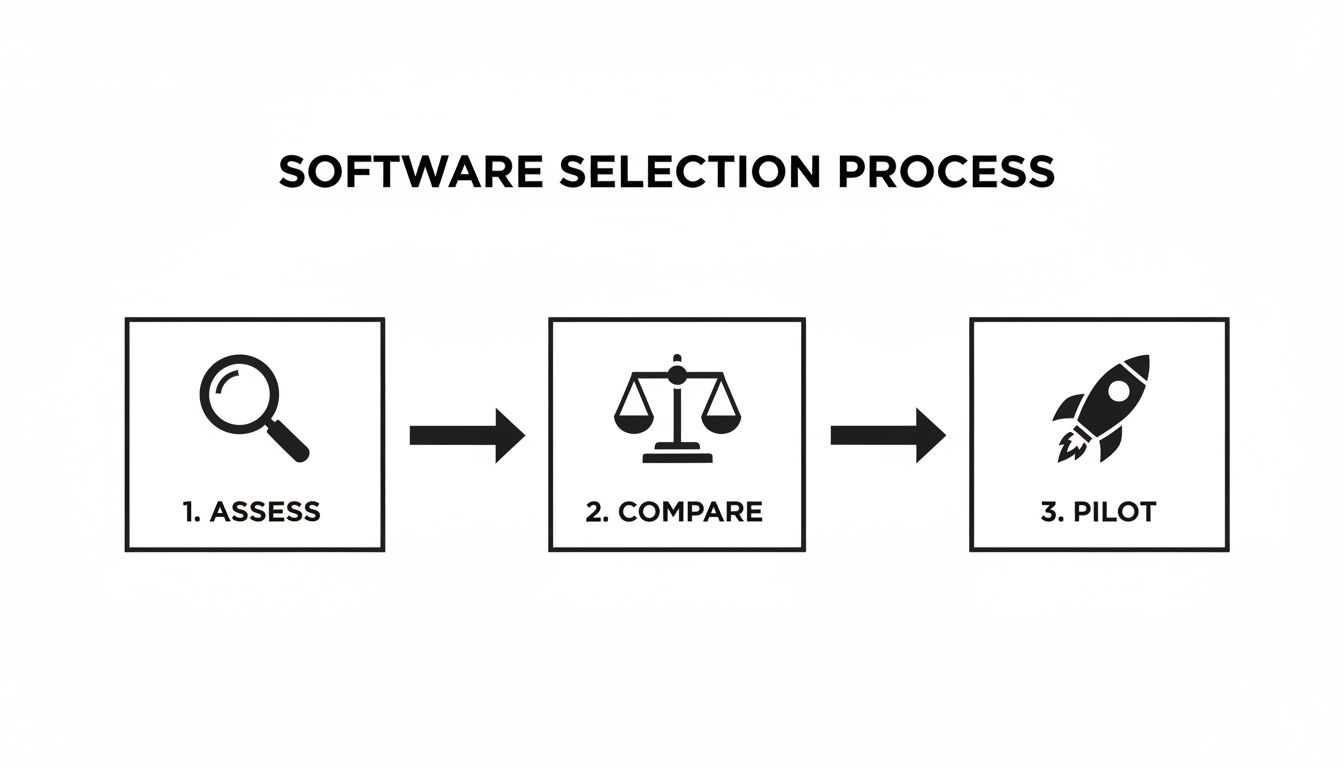
This roadmap keeps things structured, moving from assessing your needs to a focused pilot that proves the software works for you before going all-in.
Empower Your Internal Champions
Every successful tech rollout has internal champions—the team members who are genuinely excited by the new tool and can sell it to their peers. These people are your most valuable assets for driving change. They could be a tech-savvy paralegal, a forward-thinking attorney, or an operations manager who feels the pain of inefficiency every single day.
Give these champions what they need to succeed:
- Provide Advanced Training: Give them a deep dive into the platform so they become the go-to experts.
- Involve Them in Template Building: Let them help design the first automated workflows. They know the sticking points better than anyone.
- Encourage Them to Share Successes: Ask them to demo how the software saved them an hour during the next team meeting.
Their authentic excitement is contagious and way more effective at winning people over than any top-down mandate.
Overcome Resistance with Effective Training
Resistance to new workflows is human nature. The best way to get past it is with clear, practical training that answers everyone's favorite question: "What's in it for me?" Show your team exactly how the legal document automation software vaporizes their most tedious tasks and frees them up for more interesting work.
The goal is to reframe the software not as another tool to learn, but as a personal assistant that handles the repetitive, error-prone parts of their job.
This strategic approach is already working across the industry. Adoption is on the rise, with recent data showing 28% of law firms and 23% of corporate legal teams have now implemented these solutions. As organizations expand their use from simple NDAs to more complex work, the industry mindset is shifting from cautious experimentation to integrated implementation, solidifying automation's role as foundational legal technology. You can discover more insights about how document automation is reshaping the legal industry. This clear trend confirms that a well-planned rollout transforms a software purchase into a core competitive advantage.
Common Questions About Legal Automation
Jumping into any new technology brings up good questions, and legal document automation is no exception. Even after seeing the benefits, it’s natural to wonder how it all works in practice.
Let’s tackle some of the most common questions teams have before they bring an automation platform on board.
Is This Software a Replacement for Lawyers?
Not a chance. This software is a tool built to support legal professionals, not replace them. Think of it as a force multiplier—a sophisticated assistant that takes on the repetitive, low-value work like drafting standard clauses, chasing approvals, and tracking versions.
This frees up lawyers to do what they do best: provide strategic advice, navigate complex negotiations, and apply nuanced legal judgment. The whole point is to boost efficiency and accuracy, letting legal teams accomplish more without burning out.
How Hard Is It to Get This Set Up?
It varies, but modern tools are designed to be surprisingly user-friendly. Most cloud-based platforms offer intuitive, no-code template builders that let you turn your existing documents into automated workflows without needing a developer.
The best way to start is small. Pick one or two high-volume documents for a pilot project. This lets your team learn the ropes and see a quick win before you roll it out across the organization. Good vendors will also provide solid onboarding support to make sure you get up and running smoothly.
Can Automation Handle Complex or Custom Documents?
Absolutely. The best platforms are built for complexity. They use conditional logic—simple if/then rules—to adapt documents on the fly. For instance, a sales agreement template can automatically add or remove specific clauses based on the deal size, the customer's location, or the services being sold.
While setting up a highly complex document might take a bit more effort upfront, the payoff is huge. You get a dynamic, intelligent template that can generate countless accurate, bespoke variations in a tiny fraction of the time it would take to do it manually.
What Kind of Return on Investment Can We Expect?
The ROI here is about much more than just saving time.
- Time and Cost Savings: This is the most obvious benefit. Teams often see drafting and review cycles shrink by up to 80% for standard agreements. That time saved is money saved, and it frees up your team for higher-impact work.
- Risk Reduction: Automation is your best defense against human error. By using pre-approved, standardized language every single time, you dramatically lower the risk of rogue clauses and costly mistakes.
- Stronger Compliance: It ensures everyone uses the correct, most up-to-date language. This creates a clear, auditable trail, making it far easier to prove compliance and enforce internal policies.
Ultimately, this leads to more predictable legal outcomes and helps the legal team operate as a true strategic partner to the business.
Ready to transform your document workflows with the power of AI and a tamper-evident trust layer? Legal Chain helps you draft, review, and verify legal documents with unprecedented speed and integrity. Start your journey toward faster, more secure legal operations today.
Enhanced by the Outrank tool
